Complete Tutorial on AI Repair of Old Photos, 2026 Practical Guide to Mobile Phone and Computer Tools
A Complete Tutorial on Restoring Old Photos with AI: The 2026 Hands-On Guide to Phone and Computer Tools
Those old photos at home that are yellowed, blurry, scratched, and faded—in the past, restoring them meant paying a professional photographer for post-processing, but now you can do it yourself with AI tools. Whether it is a black-and-white photo of your parents when they were young, a faded color photo of your grandmother, or a blurry shot taken years ago when phone pixels were not enough, all can be restored to a clear, viewable version in minutes. This article explains the AI old-photo-restoration solutions commonly used in 2026, from phone to computer and from free to paid, suited for beginner readers to read through and get hands-on right away.
What Exactly Can AI Old-Photo Restoration Do?
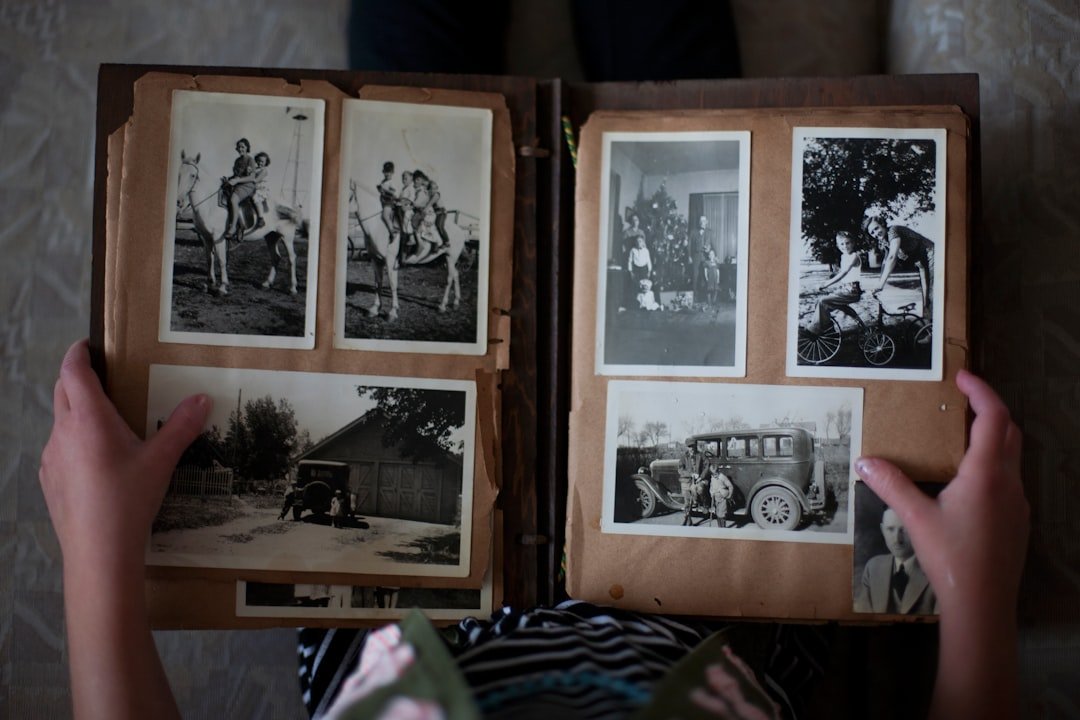
AI old-photo restoration is more capable than many people imagine. What it can do: raise the clarity of a blurry photo so facial contours become recognizable again, automatically colorize black-and-white photos to restore approximate colors, repair blemishes such as scratches, mold spots, and creases, raise the resolution of old photos so they do not look blurry on a big screen, and restore severely faded color photos to a tone close to the original.
You should also be clear-headed about what it cannot do. AI cannot see the original data and can only reasonably infer based on the pixel distribution, so the reconstructed face shape, clothing patterns, and background details are all imagined by the AI and not necessarily a 100% restoration of reality. If your expectation is for a photo to be completely identical to how it was originally shot, that cannot be achieved. But if the goal is to print the photo to hang on the wall, make an album, or pass it to family as a keepsake, the results of AI restoration are entirely sufficient.
The Typical Restoration Flow for an Old Photo
Restoring an old photo usually has four steps. Step one, scan or rephotograph to digitize the paper photo—aim your phone camera straight down, with even lighting and no glare, and import to your album. Step two, do an initial repair of scratches and blemishes, which is the AI tool's strong suit. Step three, raise clarity, sharpening the details of key parts such as faces and text. Step four, colorize or restore color, turning black-and-white into color or restoring a faded color photo to a natural tone.
Each step can use a different combination of tools; some tools do it all in one stop, while some are only good at one or two steps. Below we introduce the mainstream solutions for phone and computer separately.
Phone First Choice: Remini and Domestic Apps
Remini is the world's most famous old-photo-restoration app, and its core algorithm does very well at restoring facial detail. An old photo blurred to where only the outline is visible can, after Remini processing, have its eyes, eyebrows, and mouth corners restored to a fairly clear level. It supports iOS and Android; the free version can repair a few photos a day, and a Pro subscription is available monthly or yearly—refer to the in-app display for specific prices.
There are quite a few domestic alternatives. Meitu's old-photo-restoration feature, BeautyCam, and Wink all have built-in AI restoration capabilities, with a similar workflow of importing a photo, selecting a restoration mode, and waiting a few seconds for the output. The advantages are a Chinese interface, no need for a VPN, and low price; the disadvantage is that the detail precision is slightly weaker than Remini. For most everyday restoration, the difference is small.
Baidu's Restoration Master mini-program and Alibaba DAMO Academy's ModelScope restoration models also offer online versions, completely free, suited to those who do not want to download an app. Just search within WeChat to use them.
Computer Side: GFPGAN plus Topaz Photo AI
If you have more photos to batch-process, or pursue finer restoration results, computer-side tools are more professional than the phone.
GFPGAN is an open-source face-restoration algorithm from Tencent's ARC Lab, free to use. Tech-minded users can download it locally to run batches with Python, while ordinary users can use web-based tools packaged around GFPGAN, such as the official ARC demo page. Its results in restoring facial detail are widely recognized as strong, suited to restoring portrait close-ups.
Topaz Photo AI is commercial software positioned as high-end photography post-processing, focusing on resolution enhancement, denoising, and sharpening. For restoring old photos, you can use it to first push the clarity to the extreme, then hand it to other tools for colorization. Topaz's advantages are stable quality and many controllable parameters; its disadvantages are that it is not cheap and requires a Windows or macOS computer.
PS plus Generative Fill is another approach. Adobe has integrated AI generative fill into PS, which can intelligently repair damaged areas, suited to local fine restoration. If you are already a PS user, this workflow has the lowest learning cost.
Online Free Solutions: Alibaba DAMO ModelScope and Hugging Face
If you do not want to download any software, pure web-based restoration is the most hassle-free solution.
Alibaba DAMO Academy's ModelScope platform has opened up several image-restoration models, including GPEN face restoration, ESRGAN super-resolution, and DeOldify black-and-white colorization, runnable by uploading an image directly on the web page. The free quota is more than enough for individual users, and the Chinese interface is friendly too.
The Spaces area on Hugging Face has a large number of community-contributed restoration model demos; searching keywords such as photo restoration, colorize, and super resolution all turn up usable demos. The disadvantages are an English page, sometimes queuing, and output speed that depends on server load. But as a free experimentation tool it is very suitable—you can first compare several models' results on Hugging Face, then decide whether to pay for Remini.
Tencent's ARC Lab also has a public restoration demo web page with a Chinese interface; just upload directly, suited for elderly relatives to use.
A Tutorial on Colorizing Black-and-White Photos
Colorizing black-and-white photos is the most dramatic step in restoring old photos. The results of AI colorization are delightful and can often instantly give a decades-old photo warmth.
The mainstream free tool is DeOldify, an open-source algorithm with demos on both ModelScope and Hugging Face. It intelligently infers colors based on the objects and scenes in the image—mostly blue-gray for clothing, natural flesh tones for skin, light blue for the sky, and green for plants. The results are generally natural, but it may guess wrong on some uncommon objects, such as the specific color of a military uniform.
Online tools such as Algorithmia, Palette.fm, and Hotpot.ai all offer black-and-white colorization services, with limited free quotas and payment per image or per month. If you have dozens of photos to restore, buying a month's membership is worthwhile.
After colorizing, we recommend a bit of manual fine-tuning, adjusting the skin-tone saturation and overall color temperature to a natural, comfortable range in a phone or computer image editor—this step can take the results up another notch.
Hands-On with Clarity Enhancement and Denoising
The core tools for clarity enhancement are Real-ESRGAN and SwinIR; the former is good at realistic photo detail, the latter at cartoons and anime. These algorithms are integrated into packaged desktop tools such as Topaz Photo AI and Upscayl, where ordinary users just drag and drop a photo.
Upscayl is a free, open-source desktop app with versions for Windows, macOS, and Linux; it supports enlarging photos 2x to 4x, with processing speed depending on your graphics card. It is especially friendly to discrete-GPU users, a few seconds per photo. Integrated graphics can run it too, just more slowly.
For denoising, Topaz DeNoise and DxO PureRAW are commercial solutions with the highest precision. Free options include the Noise Reducer web version, Photopea plus plugins, and AI Image Enhancer, enough for everyday use.
The hands-on suggestion is to denoise first and then enlarge; reversing the order will enlarge the noise into color blotches. After those two steps, do colorization or repair, for a smoother flow.
After Restoration, Use AI Drawing Tools to Complete the Background or Recompose
Some old photos have the person part restored clearly, but the background is a blur or the composition is crooked; at this point you can use AI drawing tools to complete or recompose it. Cut out the person part, have the AI drawing tool generate a new background, and then composite.
On iOS, Lingtu is an AI image-generation app available in the China region; it aggregates a Midjourney-style atmosphere engine, a Flux-style realistic engine, and a Nano Banana-style fast engine, and you can download it by searching for Lingtu directly, with no VPN needed. Giving a restored old photo a period-appropriate background image, or making a digital photo frame based on the original photo's tone, takes the overall presentation up a level. The Chinese interaction is very smooth, so even when used by parents there is no need to learn English jargon—it is worth a try.
On the computer side, you can use Stable Diffusion plus ControlNet for higher precision but a higher barrier, suited to the tech-minded. The lightweight phone solution is already enough for most family scenarios.
Suggestions for Archiving and Printing After Restoration
Do not store restored old photos only on your phone; we recommend backing them up to cloud storage and an external hard drive at the same time. Keep a copy each on iCloud, Aliyun Drive, and Baidu Netdisk, plus a portable hard drive storing the original scans and restored versions—this triple-backup setup is the standard practice for a family photo library.
If you plan to print the photos to hang on the wall or make an album, choose a high-definition version of 300 dpi or above; you can order a deluxe album or framed mounting on JD.com, Taobao, or a local photo studio. A restored photo of your grandparents in their youth, paired with a walnut frame and displayed in the living room, is a family gift full of warmth.
The restored digital version can be made into a family digital album, stored on a NAS or cloud storage, and set as a link accessible to the whole family, so elders can browse it conveniently too.
Frequently Asked Questions
Will an AI-restored face turn into a different person?
There will be some difference, especially when the original photo is extremely blurry, as the facial details the AI reconstructs are inferred from its training data and not necessarily completely identical to the actual person. The usual practice is to have an elder or a family member who knows the person confirm whether the overall expression is right after restoration; if the difference is too large, rerun it with a lighter restoration mode to preserve the original contour features.
Should I pay for Remini to restore old photos?
If you are only restoring a few, the free version's daily quota is enough. If you have dozens to batch-restore, you can buy a month's membership to process them all at once and then unsubscribe; a cost of a few dozen yuan can solve a lifetime's worth of old-photo problems. If you do not want to pay, domestic options like Meitu and Alibaba ModelScope can achieve close results, just a bit slower per image.
Are the colors accurate after colorizing a black-and-white photo?
Not necessarily accurate. AI colorization is a guess based on training data, with a high probability of guessing right for common objects like skin, plants, sky, and wood, but specific clothing colors and accessory colors come down to luck. After restoration it is best to let the elders at home take a look; if they remember the color of a piece of clothing back then, you can manually adjust the hue to the right color in an editor.
What is the best way to scan old photos?
If you have a flatbed scanner, the scanned quality is best, and we recommend at least 600 dpi resolution. Without a scanner, rephotograph straight down with your phone camera, shooting by a window or under a white desk lamp with even indoor lighting, avoiding glare and shadows. Phone apps like CamScanner and Bai Miao have built-in perspective-correction features that can automatically correct a rephotographed shot to a straight-on, level angle.
Can restored photos be used commercially?
If the photos are your family's own private photos, restoring them and using them only for family archiving, album printing, and social sharing is entirely fine. If you want to take on restoration jobs as a side business, ensure the client owns the original photo and holds the likeness rights, to avoid likeness disputes involving third parties. If the photos come from the internet or historical archives, confirm the copyright status of the original material before commercial use.
📝 本文来自抖文 www.douwen.me ,转载请保留出处。
原文链接:https://www.douwen.me/archives/1261/
💬 评论 (8)
Best summary I've read on this.
Bookmarked for reference.
Clear and to the point.
Thanks for the detailed comparison.
Sharing this with my team.
Stats really back it up.
Step-by-step is gold.
Solid breakdown, very useful.